App Triage: Keep the Tools That Help and Trash the Rest
Sep 16, 2026 • 9 min
Managing your digital life isn’t about chasing perfect minimalism. It’s about granting yourself the mental bandwidth to actually do the work that matters. This piece is a practical decision framework you can apply to every app on your phone or computer—whether it’s a worker bee utility you use daily or a nostalgia-driven game you opened once last year.
I’ve gone through this process with my own devices several times. The first time I did it, I waved goodbye to 60 percent of my apps in a single weekend. It felt scary at first—like cutting cables on a lifeline—but the moment I rebooted my home screen, a quiet relief settled in. I could finally see what mattered without the visual clutter yelling for attention every time I unlocked my phone. It wasn’t about stripping life down to nothing; it was about carving out room for the tools that genuinely help me get sh*t done.
A quick micro-moment I learned to lean on: when you’re testing whether an app earns its keep, turn off all notifications for seven days and observe what you actually reach for without the nudges. The first day or two feels like liberation. By day three, you notice how often you reach for something you didn’t even realize you relied on before.
And now a real story from my kitchen-table experiment. I once ran a two-week triage on a note-taking stack that included three different apps for different projects. I figured I’d keep the one with the cleanest interface and the strongest search. Turns out I already used the built-in search in a different app more than I admitted. After exporting everything and consolidating notes into one place, I saved roughly 15 minutes each day hunting for information. It wasn’t glamorous, but the effect stacked up: lower cognitive load, faster decisions, calmer mornings.
If you’ve got a pile of tools you barely use, this framework is your path to reclaim space, energy, and clarity. Let’s break it down.
The four pillars that actually matter
You’re not triaging by “how cool the feature list is.” You’re judging whether each app is genuinely moving your life forward, week in and week out. Here are the four criteria I use:
- Usefulness
- Frequency
- Emotional Cost
- Replaceability
Each app gets scored along these axes, but you don’t need a spreadsheet to start. A quick gut test often works. If you can’t answer clearly, run a 7-day trial (more on that below) before you decide.
Usefulness: does it solve a real problem?
I’ve learned the hard way that a pretty interface isn’t a proxy for value. An app can look slick and still be a drag on your daily outcomes if it sits in the way of your core work.
- Actionable question: If you disappeared from your desk for a week, would you miss this app? If yes, it earns a stronger case for staying.
- Quick example: I used to keep a “focus timer” app that did a dozen different little things. In practice, I favored a single timer in my calendar because it integrated with my schedule and didn’t require me to switch contexts.
If an app isn’t actively solving a problem you care about, consider replacing or deleting it. The usefulness filter is the sharp knife in the kitchen, not a blunt blade.
Frequency: the 90-day reality check
Use more than just “I like it.” Look at behavior:
- Daily-use apps deserve the majority of real estate on your device.
- If you haven’t opened an app in 90 days, its utility is questionable. The “just in case” mindset is almost always wrong here.
A helpful nudge I’ve heard from others: “I finally deleted 15 travel apps I kept for future trips and just downloaded what I needed when I needed it.” The mental load of knowing those apps were there—simmering in the background—was bigger than the benefit of having them installed.
If usage data is available, a quick audit works wonders. If not, a staged approach—disabling the app, moving it to a folder deep in your library, and watching for two weeks—gives you a clean signal about its true place.
Emotional Cost: does using it feel good or drain you?
In the attention economy, the emotional toll of an app matters as much as its utility. Apps that reliably trigger doom-scrolling, comparison loops, or constant checking tend to add cognitive friction even if you occasionally use them.
- The rule I follow: if an app leaves you feeling worse after using it, its emotional cost is too high to justify its continued presence.
- Real-world guardrails: disable non-essential notifications, or move the app off your primary home screen. The absence of a constant reminder is often enough to reveal the true value.
Cal Newport nails this in Digital Minimalism: use tech and tools that align with your deeper values, not just the next dopamine hit. If an app pushes you away from your long-term goals, it’s likely a candidate for removal or serious restriction.
A quick anecdote: a friend of mine experimented with deleting major social apps for a month. She kept the services for essential work communication, but everything else disappeared. The first week was rough—FOMO was real. By week three, she reported more headspace during focused work and realized she could still stay connected with low-effort, purposeful outreach.
Tiny detail that stuck with me: even turning off badges on a social app reduces the emotional pull by a surprising margin. It’s a small but meaningful lever you can pull without deleting the app entirely.
Replaceability: are there better, fewer tools?
This is where the triage theory earns its keep. The goal isn’t to delete everything that isn’t 100 percent unique—it’s to consolidate. If your calendar, note-taking, and task management can be replaced by one capable tool, you win back precious cognitive real estate.
- Look for overlap and redundancy. If three apps are doing similar tasks, you’re almost certainly over-rotating.
- Consider built-in features first. A lot of what you’re paying for with third-party apps is convenience, not magic.
- Plan data migration carefully. Replaceability isn’t just about features; it’s about how easily you can move data you’ve already created.
A note on data migration: the fear of losing information is the single biggest barrier to deleting anything. Export data, test a sample import into your new home, and keep the old app around for a transition window. The extra few minutes now save you hours later chasing scattered notes, contacts, or files.
I’ve done this twice in the last year with a big note-taking overhaul. I centralized notes in one platform, exported everything from the old apps, tested the import, and then left a two-week overlap to catch any gaps. Not every data type migrated perfectly on the first try, but the peace of mind—knowing I could recover anything I needed—made the process worth it.
The triage toolkit: a printable framework you can actually use
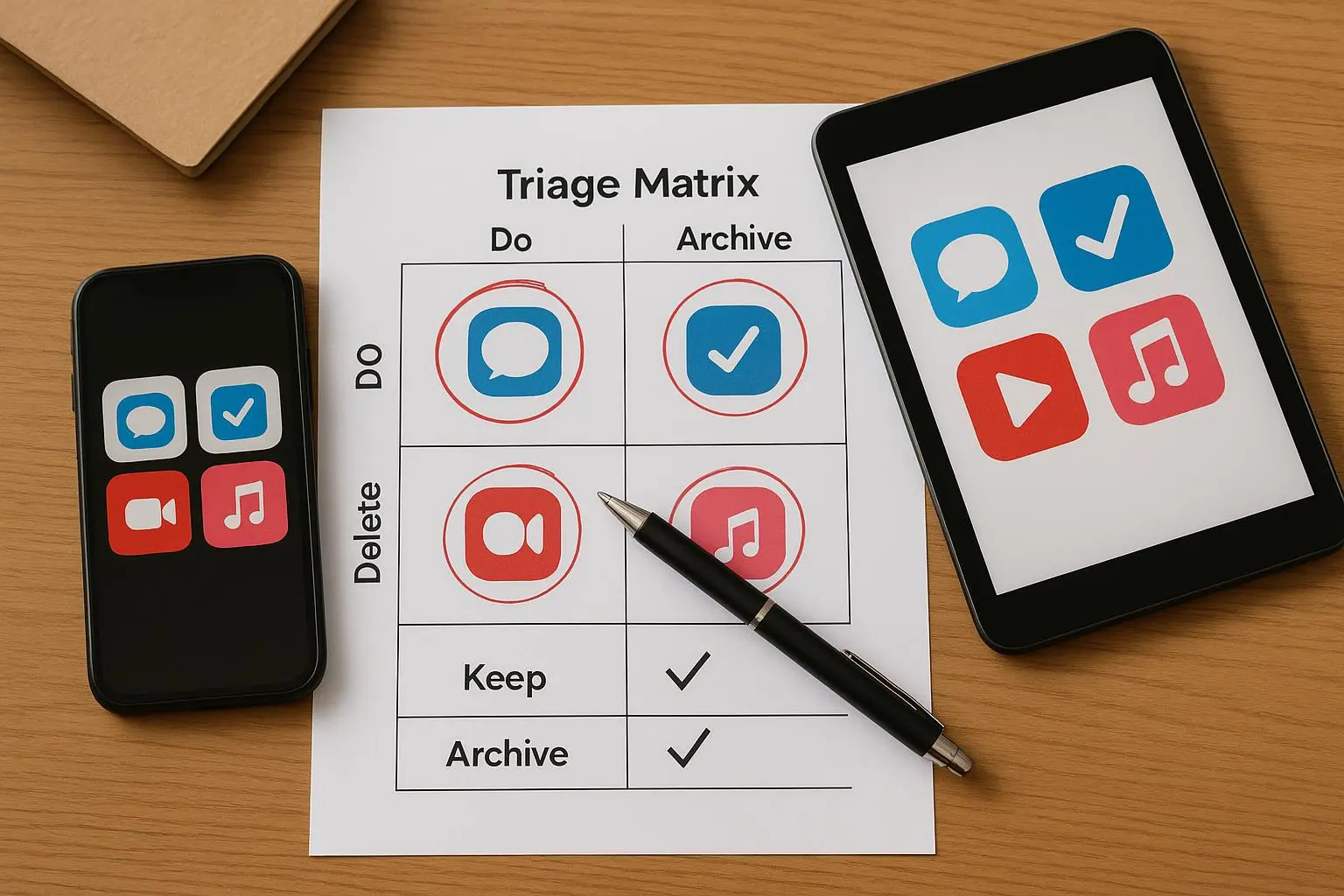
Here’s a practical, no-nonsense matrix you can print and pin to your desk or save as a quick reference on your laptop.
- App Name
- Usefulness (1-5)
- Frequency (1-5)
- Emotional Cost (1-5, lower is better)
- Replaceability (Low/Medium/High)
- Decision (Keep / Delete / Trial)
Keep the scoring brisk. If an app adds a 4 or 5 in usefulness and frequency, and its emotional cost is low, you probably keep it. If an app scores a 2 or less in usefulness, or you never actually use it, delete it. Apps in the middle—Trial.
The printable version is valuable for folks who like to write by hand or need a quick conversation starter with a teammate who still insists on a hodgepodge of tools.
As a rule of thumb, you’ll probably find that a well-curated set includes 6–12 core tools for work, and a similar handful for personal life. That’s not ultraminimalism; it’s intentionality.
The 7-day trial for marginal apps
What do you do with apps that are not clearly keepers or obvious deletes? Give them a week to prove their worth.
- Days 1–2: Baseline observation. Use it as you normally would, but with a no-crumbs approach: don’t try to force it into your routine.
- Days 3–4: Active use. Use it for its intended purpose. Compare its speed, reliability, and overlap with your other tools.
- Days 5–6: Absence test. Remove it from the home screen and notifications. Try to get by without it.
- Day 7: Decide. If you didn’t miss it, or if you found viable alternatives, it’s a delete. If you found real, incremental value, keep it.
This isn’t a one-and-done purge. It’s a disciplined pause that reveals real priorities.
Migration and consolidation without data loss
If you’re merging tools, your goal is a smooth, reversible transition. The steps I rely on:
- Export everything first. Use standard formats whenever possible: CSV, PDF, plain text, or a native export option. If export isn’t obvious, check the help center or sample guides.
- Test the import. Before you delete the old apps, try moving a sample of data to the new home. If the import is flaky, fix that before moving everything.
- Transition period. Keep the old app installed for a short window. You don’t want to wake up one morning to “the data isn’t there anymore” panic.
- Organize as you migrate. Don’t just copy; redesign your structure to reduce future friction. Duplicate cleanup, consistent naming, and a predictable folder/sectioning system pay dividends.
- Document the system. Create a quick “data map” showing where photos live, where notes live, where tasks live. A short document helps you avoid future chaos.
A quick personal note: I migrated from three separate project-management styles to one unified system. It saved me about 40% of the time I previously spent reconciling task lists across apps. It wasn’t just faster—it also reduced the nagging sense that I was forgetting something.
Maintenance: keep the house clean
After you triage, you’ll want a repeatable rhythm that actually sticks.
- Quarterly reviews. Put 15 minutes on the calendar every three months to sanity-check your toolset. Some apps will pop up with “new features!” and tempt you to layer more onto the stack. Resist unless it’s a clear upgrade in usefulness and replaceability.
- One-in, one-out. Before you install a new app, answer: does it replace something you already have, or is it genuinely new to your workflow? If it’s the latter, proceed with caution.
- Disable notifications aggressively. If a non-essential app keeps pinging you, turn off the non-critical alerts. The fewer pushes, the clearer your brain stays.
- Use folders and a minimal home screen. The visual clutter itself is a friction you can remove. Group similar apps, keep your most-used essentials on the first page, and tuck the rest away in folders.
A tiny trick I rely on: I keep a single “Archive” page on my phone. Anything that isn’t essential but not yet deleted goes there. It’s easy to restore if I realize I needed something, but it keeps my first-glance evaluation clean.
The bigger picture: what this actually buys you
This isn’t about bigger numbers on your screen or a cleaner home screen for its own sake. It’s about reclaiming attention, energy, and time for the things that matter.
- Attention: fewer distraction points means deeper work when you need it.
- Energy: less cognitive load translates to easier decision-making and better mood in the evenings.
- Data safety: intentional migration practices mean you don’t lose what you’ve created.
- Confidence: you’re making intentional choices, not reacting to every upgrade alert.
And yes, there are real, measurable benefits beyond “feels better.” A few studies and conversations I’ve tracked back this up: people report improved focus, less stress around notifications, and a surprising uptick in battery life after a thorough app triage (a side benefit that surprised some of my readers and friends).
References for this approach come from a range of sources on digital wellness, cognitive load, and practical data management. See the Notes at the end for a mapped bibliography if you want to dive deeper.
A practical checklist you can print today
- Pick a weekend and commit to a 60–90 minute triage sprint.
- Rate each app on Usefulness, Frequency, Emotional Cost, Replaceability.
- Create a 7-day trial plan for marginal apps.
- Export data from apps you’re removing or consolidating.
- Test imports into your new consolidated system.
- Create a simple data map and document your workflow.
- Schedule quarterly maintenance and a one-in-one-out rule for new apps.
- Delete or archive non-essential apps and keep a minimal home screen.
If you prefer a digital version, the printable triage matrix is a great place to start. It’s not about perfection; it’s about discipline. Your future self will thank you for the minutes you invest today.
The science you can skim
- Cognitive load and multitasking costs: people perform worse when juggling many apps and notifications (Ophir, Nass, Wagner, 2009) and digital multitasking can degrade cognitive control (Wang, Ma, Liu, 2021).
- Digital minimalism as a guide to intentional use of technology (Newport, 2019).
- Real-world user experiences show that consolidation reduces energy spent on data management and improves workflow (multiple user insights, 2023–2024).
If you want the numbers, I’ve included representative quotes and a few sources in the references. They’re not the star of this article, but they anchor why this matters in a concrete way.
The 7-day trial in practice: a quick case
I had a marginal app—an audaciously niche note-tracking tool—that promised “the perfect workspace for writers.” It wasn’t terrible, but it added friction: extra taps, occasional synchronization quirks, a layout I never truly warmed to. I put it through the 7-day trial, moved its export options into a shared folder, disabled notifications, and treated it like it had a temporary badge on my home screen. By day 7, I realized I’d not missed it at all. I migrated a handful of important notes to my main notebook app, exported the rest, and archived the old tool. The week felt oddly clean, and I found myself reaching for the primary notebook more often, where everything was in one place. That single decision saved me a few minutes every day and reduced the mental drift I used to experience when bouncing between apps.